SATELLITE SUPPORT
https://www.sat-support.tv/forum/

OE 6.0 - Feed-server local Enigma2
https://www.sat-support.tv/forum/viewtopic.php?f=228&t=62293
Page 1 of 1

Author:  mihaip [ 27 Sep 2026, 12:28 ]
Post subject:  OE 6.0 - Feed-server local Enigma2

OE 6.0 - Feed-server local

Intrebarea a fost adresata "prietenului" Google AI ... surprinzator de
documentat ! Eu l-am intrebat cum sa-l gazduiesc local pe un stcik USB !
Voi da aici raspunsul documentat al "prietenului" meu !

Step 1: Format and Mount the USB StickFormat your USB stick to ext4
(recommended for Linux permissions) or FAT32. Plug the USB into the
Enigma2 box. Verify where it is mounted via SSH/Telnet using the command.
Code:
df -h

Typically, it mounts to /media/usb or /media/hdd.

Step 2: Prepare the IPKs and Packages Index. Oopkg requires an index file
named Packages.gz to read a feed directory. You can create this on a PC
or right on the box. Create a folder on the USB stick named feed (e.g.,
/media/usb/feed/). Drop all your desired .ipk plugin files into this folder.
Generate the index file. If doing it directly on the receiver via SSH, navigate
to the folder and run:
Code:
bash
cd /media/usb/feed
opkg-make-index . > Packages
gzip Packages

This creates the required Packages.gz file in the folder.

Step 3: Add the Local Feed ConfigurationYou need to tell the Enigma2 package
manager to look at your USB stick. Connect to your box via FTP (using a client
like FileZilla or WinSCP). Navigate to /etc/opkg/. Create a new text file named
local-usb-feed.conf. Add the following line to the file (adjusting the path if
your USB mounts elsewhere) :
Code:
textsrc/gz local-usb_feed file:///media/usb/feed

Save and upload the file back to /etc/opkg/.

Step 4: Refresh and Install Plugins. Run the standard package manager
commands via SSH to sync with your USB:
Code:
bash opkg update

You should see local-usb_feed updating successfully. You can now open your
Enigma2 box's Plugin Menu (Download Plugins) to see your customized list,
or install directly via the command line:
Code:
bash
opkg install <plugin-name>

Author:  mihaip [ 27 Sep 2026, 13:13 ]
Post subject:  Re: OE 6.0 - Feed-server Enigma2 loca

Solutia propusa de Google AI este una cunoscuta si discutata si pe alte forumuri
ca de exemplu OpenATV. In esenta, nu este vorba exclusiv despre un stick USB,
ci in general despre un suport de stocare ... de exemplu chiar Flashul (emmc)
al receptorului ! O partitie (rootfs ) este de regula alocata in Multiboot la 2 Gb
desi in realitate nu ocupa mai mult de 600-700 Mb ! deci spatiu ar fi !

Iata care a fost solutia mea !

- compilarea unei imagini OpenBH 6.0
- compilarea componentelor feed-server ale imaginii
- extragerea din totalul acestora ( ~2.5 Gb ) al celor semnificative
(drivere, pluginuri extensie, softcamuri, pluginuri system )
- crearea in Rootfs de pe receptor a unui director /local-feed
- popularea acestuia cu extrasul de mai sus ( .ipk ) via FTP
- aleg sa gazduiesc temporar /local-feed pe o imagine OpenATV
functionala pentru ca vai avea nevoie de suportul sau de dezvoltare
- instalez utilitarele "opkg" necesare pregatirii feed-serverului
si lansez crearea indexului componentelor din feed
Code:
opkg install opkg-util
cd /local-feed
opkg-make-index . > Packages
gzip ./Packages

Aici ma despart de "prietenul" Google AI ! Nu exista in imaginea OpenATV
componenta ceruta pentru a include in imaginea tinta acest server de feed !
deci o vom face manual pe un receptor Zgemma H9S SE !
In imaginea OpenBH compilata si instalata localizez /etc/opkg folderul gazda
al referintelor la serverul de feed ! si editez manual "h9se-feed.conf"
Code:
src/gz openbh-h9se file:///local-feed

- copiem directorul server de feed (/local-feed ) via FTP pe receptor
- dam un restart de GUI si ...
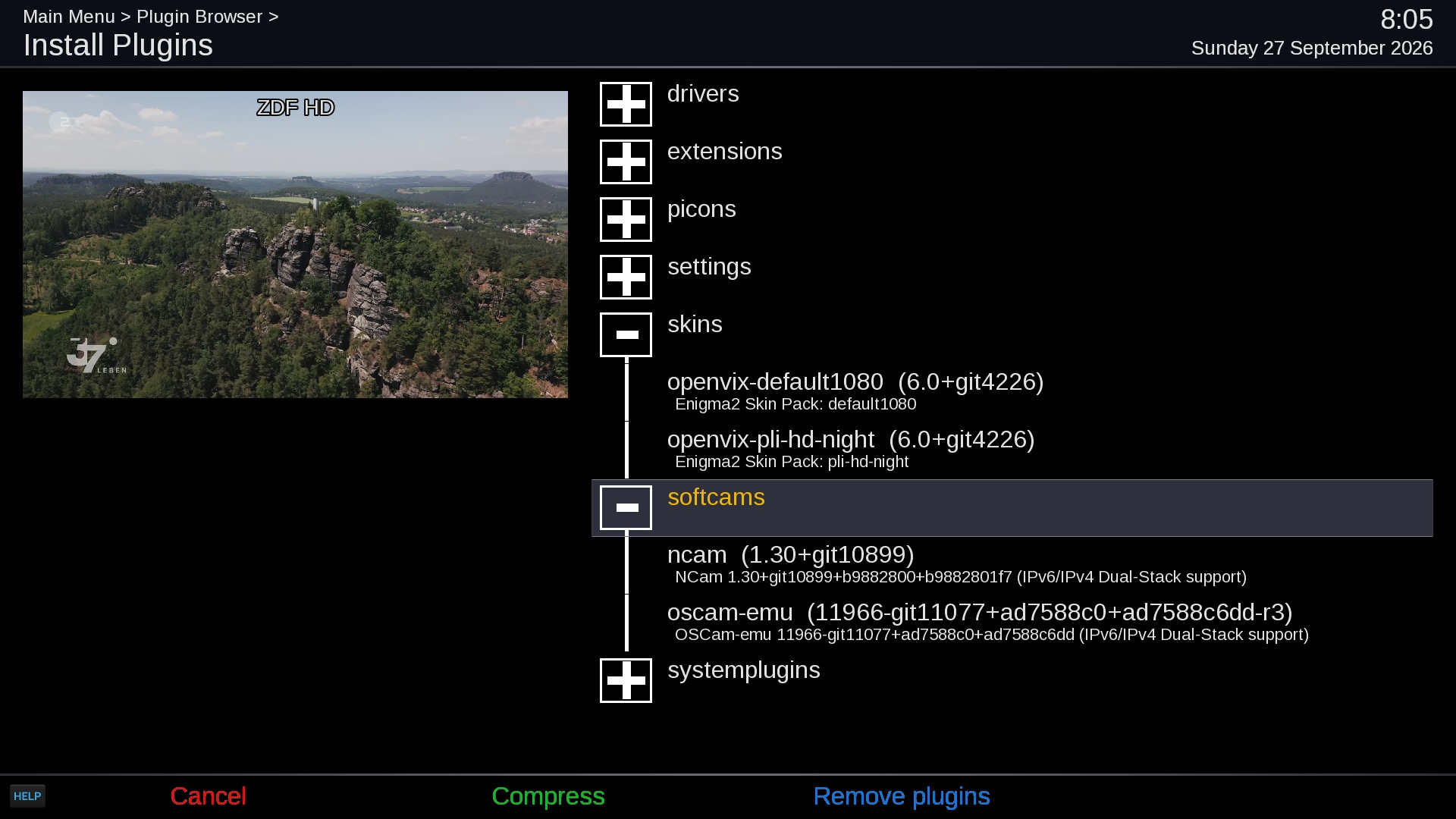
Image

Eu cred ca procedura completa descrisa de Google AI poate fi facuta integral
pe serverul de build dupa constructia Imaginii si a Feed-ului ! unde precis
exista si componenta lipsa in OpenATV ! O sa incerc !

Author:  mihaip [ 08 Oct 2026, 10:02 ]
Post subject:  Re: OE 6.0 - Feed-server local Enigma2

Ideile enuntate mai sus , dupa o indelungata orbecaiala , si-au gasit
o rezolvare de succes ! o gasiti in topicul dedicat OpenBH 6.0 !!!

Page 1 of 1 All times are UTC + 2 hours [ DST ]
Powered by phpBB © 2000, 2002, 2005, 2007 phpBB Group
http://www.phpbb.com/